

Having a professional website is only the first step toward building an online presence. If potential customers cannot find your website through Google, even a well-designed website may generate little traffic or few inquiries. This is where SEO for business websites becomes important.
Search engine optimization, commonly known as SEO, helps search engines understand your website and helps potential customers discover your pages when they search for relevant products, services, or information.
But SEO is more than adding keywords to a webpage. It involves website structure, technical performance, content, search intent, user experience, internal linking, and authority.
In this guide, I’ll explain how SEO works, cover the most important website SEO basics, and share practical SEO steps that businesses can use to improve their online visibility.
If you’re building or improving a business website, I can help you create a WordPress website with SEO and user experience considered from the beginning. Explore my [WordPress Development] internal service page.
What Is SEO for Business Websites?
SEO for business websites is the process of optimizing a website so search engines can understand its content and users can find it through relevant organic searches.
For example, imagine you offer website development services. Your potential customers might search for:
- WordPress development services
- business website development
- website designer
- SEO services
- website redesign services
- UI/UX design services
When your website is properly optimized, search engines have a clearer understanding of your services and the topics your pages cover.
SEO focuses on organic search visibility, meaning traffic that comes from unpaid search results. Unlike paid advertising, you don’t pay a search engine for every organic click.
However, SEO is a long-term process. It requires a combination of strategy, quality content, technical improvements, and continuous optimization.
How SEO Works
Understanding how SEO works starts with understanding what search engines do.
Search engines such as Google discover webpages, analyze their content and structure, and determine which pages are relevant to a user’s search.
A simplified SEO process can be divided into three major stages:
- Crawling: Search engines discover webpages and follow links to find additional content.
- Indexing: Search engines analyze and store information about pages they discover.
- Ranking: When someone searches for something, search engines determine which relevant pages should appear in the results.
Your goal is to make your website easy for search engines to crawl and understand while providing genuinely useful information for visitors.
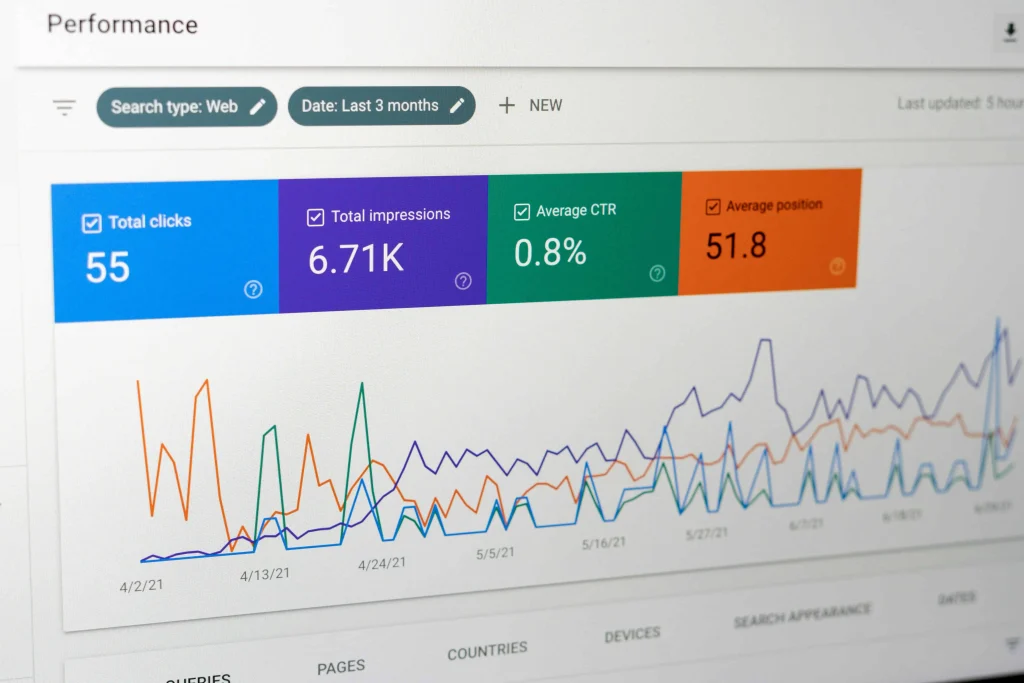
Why SEO Matters for Business Websites
A business website can serve as your online storefront, portfolio, or sales channel.
But simply having a website doesn’t guarantee visitors.
SEO can help businesses:
- Increase organic visibility
- Attract relevant website visitors
- Reach people actively searching for their services
- Build online credibility
- Generate potential leads
- Support long-term digital growth
- Reduce dependence on paid advertising
For example, someone searching for “WordPress developer for business website” already has a specific need.
Appearing in front of that person can be much more valuable than showing your website to someone who has no interest in your services.
This is why effective SEO focuses not only on traffic but on relevant traffic.
The Core Elements of SEO for Business Websites
A strong SEO strategy combines multiple areas. Focusing on just one element rarely produces the best results.
1. Keyword Research
Keyword research is the process of discovering what your potential customers search for online.
Suppose you provide WordPress development services. Relevant keywords might include:
- WordPress development
- WordPress website development
- WordPress developer
- custom WordPress website
- WordPress website redesign
The goal isn’t to use every possible keyword.
Instead, identify keywords that are:
- Relevant to your services
- Connected to your target audience
- Aligned with search intent
- Appropriate for your website’s authority and stage
2. Search Intent
One of the most important concepts in SEO is search intent.
Search intent refers to the reason behind a user’s search.
For example:
Informational intent:
“What is technical SEO?”
Commercial intent:
“Best WordPress development services”
Transactional intent:
“Hire WordPress developer”
Navigational intent:
“Google Search Console”
Understanding intent helps you create the right type of content for the person searching.
An informational search usually needs an educational article, while a service-related search may require a detailed service page.
3. On-Page SEO
On-page SEO involves optimizing elements on your own website.
Important elements include:
- Page titles
- Headings
- Meta descriptions
- URLs
- Content
- Images
- Alt text
- Internal links
- Keyword placement
- Content structure
For example, if you have a page targeting “WordPress development services,” the page should clearly explain your development process, services, benefits, technologies, and how visitors can contact you.
The keyword should appear naturally rather than being repeated unnecessarily.
Website SEO Basics You Should Know
If you’re new to SEO, you don’t need to learn every advanced technique immediately.
Start with these essential website SEO basics.
Create Clear Website Structure
Your website should have a logical structure.
Visitors should be able to move easily between your homepage, services, portfolio, blog, and contact page.
A simple structure might look like:
- Home
- About
- Services
- WordPress Development
- SEO
- UI/UX Design
- Portfolio
- Blog
- Contact
A clear structure also helps search engines understand the relationship between different pages.
Optimize Page Titles
Every important page should have a descriptive title.
For example, instead of:
Home | Website
you could use something more descriptive, such as:
WordPress Developer & SEO Services | M. Shoaib
The title should accurately represent the page and naturally include the primary topic where appropriate.
Write Useful Meta Descriptions
A meta description provides a short summary of a webpage.
Although it isn’t simply a ranking switch, a clear and relevant description can encourage searchers to click your result.
Your description should tell users what they can expect from the page.
Use Proper Headings
Headings help organize your content.
Use one clear H1 for the primary topic, followed by H2 and H3 headings for supporting sections.
For example:
- H1: WordPress Development Services
- H2: My WordPress Development Process
- H2: WordPress Services
- H3: Business Websites
- H3: E-commerce Websites
This creates a structure that is easier for both visitors and search engines to understand.
Technical SEO for Business Websites
Technical SEO focuses on the foundation of your website.
A website can have excellent content but still struggle if search engines cannot efficiently crawl, render, or index its pages.
Important technical areas include:
- Website speed
- Mobile responsiveness
- HTTPS
- XML sitemap
- Robots.txt
- Indexability
- Crawlability
- Canonical URLs
- Broken links
- Core Web Vitals
- Structured data
If you’re using WordPress, technical SEO should be considered during development.
Choosing a lightweight theme, optimizing images, limiting unnecessary plugins, and maintaining clean website architecture can all contribute to a healthier website.

Website Speed and User Experience
Website performance affects more than SEO.
Visitors expect websites to load quickly and work smoothly.
A slow website can make visitors leave before they explore your services or contact you.
Common causes of slow websites include:
- Large images
- Too many plugins
- Unoptimized scripts
- Poor hosting
- Excessive animations
- Unnecessary third-party resources
Some practical improvements include:
- Compress images before uploading them.
- Use modern image formats where appropriate.
- Remove unnecessary WordPress plugins.
- Enable caching.
- Optimize CSS and JavaScript.
- Use reliable hosting.
- Test your website on mobile devices.
A fast website provides a better experience for users while giving your SEO strategy a stronger technical foundation.
Mobile SEO
Your website should work properly on smartphones and tablets.
Mobile optimization means more than making the page technically responsive.
Check whether:
- Text is easy to read.
- Buttons are easy to tap.
- Navigation is simple.
- Images fit the screen.
- Forms work correctly.
- Pages load quickly.
- Important content is accessible on smaller screens.
Before publishing a website, test it on multiple screen sizes.

Content SEO
Content gives your website opportunities to appear for relevant searches.
A business website shouldn’t only contain service pages. A blog can help answer questions potential customers have before they decide to contact you.
For example, a web development professional could publish articles about:
- How to choose a WordPress developer
- How much does a business website cost?
- WordPress vs other website platforms
- Website speed optimization tips
- SEO basics for beginners
- Common website design mistakes
- How to improve website conversions
These articles can attract visitors at different stages of the buying journey.
Create Content Around Real Questions
Before writing an article, ask:
What problem is my target audience trying to solve?
Then create content that gives them a useful answer.
Avoid writing articles simply because a keyword has search volume.
The best business content connects a searcher’s question with genuine expertise and practical advice.
SEO for Small Businesses
SEO for small businesses can be particularly useful because smaller companies often need to make their marketing budget work efficiently.
Instead of competing immediately for extremely broad keywords, focus on specific topics and services relevant to your audience.
For example, rather than targeting only “web design,” you could create content around more specific searches such as:
- WordPress website development for small businesses
- SEO for local businesses
- website redesign for small companies
- affordable business website development
More specific searches can often provide clearer insight into what the searcher wants.
Don’t Forget Local SEO
If you provide services to customers in a particular city or region, local SEO may also be important.
Make sure your business information is accurate and consistent across relevant online profiles.
Your website should clearly communicate:
- Your services
- Your location or service area
- Your contact information
- Your areas of expertise
- How customers can work with you
Internal Linking
Internal linking is one of the simplest SEO techniques you can implement on your own website.
An internal link connects one page on your website to another.
For example, this article can naturally link to your WordPress development service page when discussing WordPress websites.
It could also link to your SEO service page when discussing technical and on-page SEO.
Internal links can:
- Help visitors discover related content
- Improve website navigation
- Help search engines understand website structure
- Distribute authority between relevant pages
Internal Link Opportunities for mshoaib.site
WordPress Development:
Link the phrase “WordPress development services” to your WordPress service page.
SEO Services:
Link the phrase “SEO services” to your dedicated SEO service page.
Related Blog:
Link to another article about WordPress, website speed, SEO, or UI/UX when relevant.
Use descriptive anchor text rather than generic phrases such as “read more.”
Backlinks and Off-Page SEO
SEO also involves factors outside your own website.
One important area is backlinks—links from other websites to your website.
Relevant, trustworthy backlinks can help establish your website’s authority and credibility.
Instead of trying to obtain hundreds of random links, focus on earning relevant mentions through useful content and professional relationships.
Potential approaches include:
- Publishing original resources
- Writing expert articles
- Contributing to relevant websites
- Creating useful guides
- Building professional relationships
- Promoting valuable content
Avoid low-quality link schemes or irrelevant links created purely to manipulate rankings.
SEO for a New Website
If you’ve just launched a new website, don’t expect it to immediately rank for highly competitive keywords.
Start with a strong foundation.
SEO Checklist for a New Business Website
- Set up Google Search Console.
- Submit your XML sitemap.
- Make sure important pages can be indexed.
- Create optimized title tags.
- Write useful meta descriptions.
- Optimize images.
- Check mobile responsiveness.
- Improve website speed.
- Create service pages.
- Publish useful blog content.
- Add internal links.
- Monitor organic performance.
Once the basics are in place, continue improving your website based on data.
How to Measure SEO Performance
SEO should be connected to real business goals.
Useful metrics include:
- Organic traffic
- Search impressions
- Click-through rate
- Keyword visibility
- Organic leads
- Conversion rate
- Engagement
- Revenue from organic traffic
Don’t judge your entire SEO strategy based on one keyword position.
A page ranking for a keyword is useful, but the larger goal is to attract the right people and encourage them to take meaningful actions.

Common SEO Mistakes to Avoid
Keyword Stuffing
Repeating keywords excessively can make content unnatural.
Use keywords where they make sense and focus on answering the reader’s question.
Thin Content
Don’t create dozens of pages with little useful information simply to target keywords.
Each important page should provide genuine value.
Ignoring Technical Problems
Broken links, indexing issues, slow pages, and mobile usability problems can weaken the overall website experience.
Focusing Only on Rankings
Ranking is not the final business goal.
Traffic, leads, inquiries, sales, and customer engagement matter too.
Forgetting UX
A visitor may find your website through Google but leave if the website is confusing, slow, or difficult to navigate.
SEO and UX should work together.
A Simple SEO Strategy for Business Websites
If you’re starting SEO from scratch, follow this process.
Step 1: Define Your Business Goals
Decide what you want SEO to achieve.
For example:
- More service inquiries
- More organic visitors
- More leads
- Better visibility
- More online sales
Step 2: Understand Your Audience
Research your customers’ problems, questions, and search behavior.
Step 3: Research Keywords
Find relevant keywords and group them according to search intent.
Step 4: Optimize Existing Pages
Improve titles, headings, content, URLs, images, internal links, and technical elements.
Step 5: Create Helpful Content
Publish articles that answer questions your target audience actually asks.
Step 6: Build Authority
Earn relevant backlinks and mentions by creating useful content and building professional relationships.
Step 7: Measure Results
Review your performance regularly and improve pages based on data.
Service CTA: If your website needs a stronger foundation, I can help with WordPress development, technical SEO, on-page optimization, and UI/UX improvements to create a website that works for both search engines and visitors.
SEO Beginner Guide: Where Should You Start?
If you’re completely new to SEO, don’t try to implement everything at once.
Start with five priorities:
- Make sure search engines can crawl and index your important pages.
- Create dedicated pages for your main services.
- Research relevant keywords and search intent.
- Improve website speed and mobile usability.
- Publish useful content consistently.
Once these fundamentals are working, you can move into more advanced areas such as structured data, content clusters, advanced technical SEO, digital PR, and conversion optimization.
The key lesson from any SEO beginner guide is that SEO is a process, not a one-time task.
Frequently Asked Questions
How long does SEO take to work?
SEO timelines vary depending on competition, website authority, technical condition, content quality, and the market you’re targeting. Some improvements may appear relatively quickly, while meaningful organic growth generally requires consistent effort.
Is SEO important for small businesses?
Yes. SEO can help small businesses reach people who are actively searching for their products or services. A focused strategy can target relevant searches without trying to compete for every broad keyword.
Can I do SEO myself?
Yes. Many basic SEO tasks can be learned and implemented yourself. However, technical SEO, keyword research, content strategy, and larger website optimization projects can benefit from professional experience.
Does web design affect SEO?
Yes. Website structure, mobile responsiveness, navigation, page speed, accessibility, and user experience can all influence how effectively visitors and search engines interact with your website.
Should SEO be done before or after website development?
Ideally, SEO should be considered during website development. Building a clean structure, fast performance, mobile responsiveness, and appropriate page architecture from the beginning can prevent many SEO problems later.
Conclusion
SEO for business websites is about much more than placing keywords on webpages.
It is about creating a website that search engines can understand and visitors can trust.
A strong strategy combines keyword research, useful content, technical SEO, mobile optimization, internal linking, website performance, user experience, and ongoing measurement.
Whether you’re building a website for a startup, service business, local company, or personal brand, the fundamentals remain the same: understand your audience, create genuinely useful content, build a technically strong website, and continually improve it.
For WordPress websites in particular, SEO should be considered during development rather than added as an afterthought.
If you’re planning a new website or want to improve an existing one, I can help with WordPress development, SEO, and UI/UX design to build a website that is fast, user-friendly, and ready for long-term growth.
